


Oh My God she is back with her FORTRAN thing again …
Why does she keep showing us how to do this and that in FORTRAN …
Why can’t she do R and Python just like everybody else …
Don’t get me wrong I do code in R and Python most of the time. It’s just I figured out there must be at least tens of people on this planet who will wonder someday, just like I did last month : “How do I generate a nice LaTeX PDF report with FORTRAN code in it ?”.
Well, I suppose you run Fortran on Linux.
Step 1: Write the .tex file
\documentclass{article}

\usepackage[T1]{fontenc}
\usepackage{xcolor}
\usepackage{lmodern}
\usepackage{listings}
\usepackage[margin=1.0in]{geometry}

\definecolor{mygreen}{rgb}{0,0.6,0}
\definecolor{mygray}{rgb}{0.5,0.5,0.5}
\definecolor{mymauve}{rgb}{0.58,0,0.82}

\lstset{
basicstyle=\footnotesize,        % the size of the fonts that are used for the code
  breakatwhitespace=false,         % sets if automatic breaks should only happen at whitespace
  breaklines=false,                 % sets automatic line breaking
  captionpos=b,                    % sets the caption-position to bottom
  commentstyle=\color{mygreen},    % comment style
  extendedchars=true,              % lets you use non-ASCII characters; for 8-bits encodings only, does not work with UTF-8
  keepspaces=true,                 % keeps spaces in text, useful for keeping indentation of code (possibly needs columns=flexible)
  keywordstyle=\color{blue},       % keyword style
  language=[95]Fortran,                 % the language of the code
  numbers=left,                    % where to put the line-numbers; possible values are (none, left, right)
  numbersep=5pt,                   % how far the line-numbers are from the code
  numberstyle=\tiny\color{mygray}, % the style that is used for the line-numbers
  rulecolor=\color{black},         % if not set, the frame-color may be changed on line-breaks within not-black text (e.g. comments (green here))
  showspaces=false,                % show spaces everywhere adding particular underscores; it overrides 'showstringspaces'
  showstringspaces=false,          % underline spaces within strings only
  showtabs=false,                  % show tabs within strings adding particular underscores
  stepnumber=1,                    % the step between two line-numbers. If it's 1, each line will be numbered
  stringstyle=\color{mymauve},     % string literal style
  tabsize=4,                       % sets default tabsize to 2 spaces
  title=\lstname                   % show the filename of files
}

\begin{document}

Here is how one can easily insert other programming langages (like Fortran) in LaTex.

\begin{lstlisting}

    subroutine mySubroutine()

        write (*,*) "Hello"
    end subroutine

    program main
        implicit none

        call mySubroutine()

    end program main

\end{lstlisting}

\end{document}
The rules inside \lstset {} will configure your syntax highlighting. You may change them according to your own taste.
I also mentioned that language=[95]Fortran, but you may also write language=[70]Fortran if you like it more old school.
Then save your file as, say, “example.tex”.
Step 2: Install the necessary packages
>>> sudo apt-get install texlive-full
Step 3 : Generate the pdf
>>> pdflatex ./example.tex
Step 4 : Open the pdf
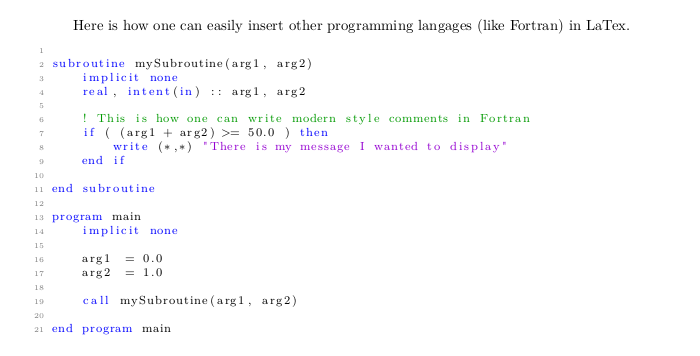
You are welcome 🙂