

PostGIS is an extension of PostgreSQL that adds support for geo-referenced data. For those who are only interested in turning a non-georeferenced Pandas dataframe into a PostgreSQL table, please refer to my post here.
1 – Sample csv file to import
For this example we are going to import the names of Montreal’s future public transit stations (REM) along with their geo-locations. The full csv file is available in my GitHub repository.

2 – Database setup
I will assume you already have PostgreSQL+PostGIS installed in your system, with an already existing user. We are just going to create the table that where our csv file will be uploaded.
We will store the each station’s latitude and longitude as a single spatial point, and use the WGS84 coordinate system (which corresponds to the spatial reference identifier 4326).
Also let’s grant our PostgreSQL user – identified by myuser in the following post – the rights to work with our stations table.
create table stations (
    name varchar(64),
    geom geometry(Point, 4326)
);

grant select, insert, update, delete on table stations to myuser;
3 – Python Code
The following python code will
- load the csv into a Pandas dataframe
- insert each row into the stations table, keeping their name as a separate column, and merging the longitude and latitude columns into a single point geometry.
import os
import sys
import pandas as pd
import psycopg2


# Connection parameters
param_dic = {
    "host"      : "localhost",
    "database"  : "globaldata",
    "user"      : "myuser",
    "password"  : "Passw0rd"
}


def connect(params_dic):
    """ Connect to the PostgreSQL database server """
    conn = None
    try:
        # connect to the PostgreSQL server
        print('Connecting to the PostgreSQL database...')
        conn = psycopg2.connect(**params_dic)
    except (Exception, psycopg2.DatabaseError) as error:
        print(error)
        sys.exit(1)
    print("Connection successful")
    return conn


def execute_query(conn, query):
    """ Execute a single query """
    ret = 0 # Return value
    cursor = conn.cursor()
    try:
        cursor.execute(query)
        conn.commit()
    except (Exception, psycopg2.DatabaseError) as error:
        print("Error: %s" % error)
        conn.rollback()
        cursor.close()
        return 1
    # If this was a select query, return the result
    if 'select' in query.lower():
        ret = cursor.fetchall()
    cursor.close()
    return ret


def single_inserts(conn, df, table):
    """Perform single inserts of the dataframe into the PostGIS table"""
    for i in df.index:
        vals  = [df.at[i,col] for col in list(df.columns)]
        query = """ INSERT INTO %s(name, geom)
                    VALUES('%s', ST_GeomFromText('POINT(%s %s)', 4326))
                """ % (
            table,
            vals[0],
            vals[1],
            vals[2]
        )
        execute_query(conn, query)


def main():
    # Database connection
    conn = connect(param_dic)
    # Read the csv file
    df = pd.read_csv("./stations.csv")
    #Run the execute_many strategy
    single_inserts(conn, df, 'stations')
    # Close the connection
    conn.close()
4 – Visualize your stations
For this you can use PgAdmin.

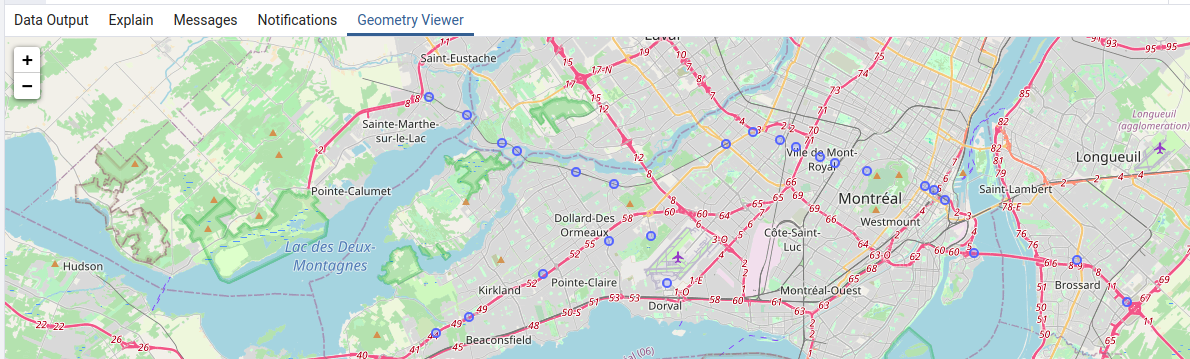
Cherry on the top: because we have used SRID 4326 to store our geometries, PgAdmin will even show us our points on a map 🙂