
Introduction
Today, I will be talking about how to generate a nice pdf report with text, code, plots, and formulas using R markdown.
For those of you who are in a hurry, you will find the entire code at the end of this post. Simply skip to Step 2 to learn how to convert it into pdf.
Once again, I will explain how to do this in command line. Because why would anyone need graphical interfaces when they have Vim ?
Step 1 : Create a basic .Rmd file
Save the following lines in a file named, say, “my_report.Rmd” :
---
title: "My PDF Report with R Markdown"
author:
- First Name, Last Name
output: pdf_document
fontsize: 12pt
---
Step 2 : Convert .Rmd -> PDF
Command line in the same directory
>> Rscript -e “rmarkdown::render(‘./my_report.Rmd’)”
You sould find a file named my_report.pdf in the same directory.
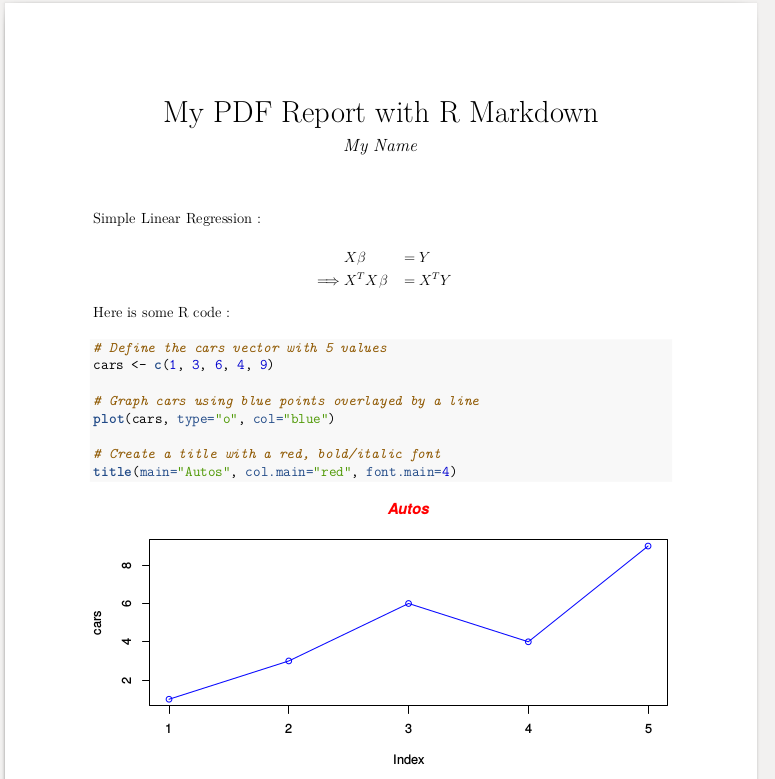
The file should look like this :

Step 3 : Add some text, and a formula
Simple Linear Regression :

$$
\begin{aligned}
         &X \beta &&= Y \\
\implies &X^{T} X \beta &&= X^{T} Y \\
\end{aligned}
$$
Formulas are written using LaTex formatting.
Step 4 : Add some R code, and a plot
Here is some R code :

```{r}
# Define the cars vector with 5 values
cars <- c(1, 3, 6, 4, 9)

# Graph cars using blue points overlayed by a line
plot(cars, type="o", col="blue")

# Create a title with a red, bold/italic font
title(main="Autos", col.main="red", font.main=4)
```
More “generic” plot ideas here.
Step 5 : Change the plot size
In the above code, change
```{r}
for
```{r, fig.width=8, fig.height=4}
Step 5 : Summary
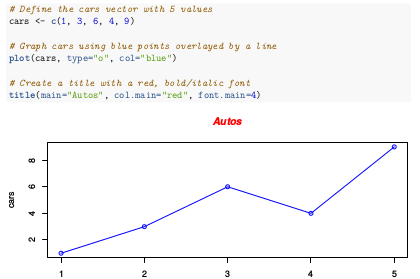
Here is the entire sample code and the resulting PDF you can expect to have.
---
title: "My PDF Report with R Markdown"
author:
- My Name
output: pdf_document
fontsize: 12pt
---

Simple Linear Regression :

$$
\begin{aligned}
         &X \beta &&= Y \\
\implies &X^{T} X \beta &&= X^{T} Y \\
\end{aligned}
$$

Here is some R code :

```{r, fig.width=8, fig.height=4}
# Define the cars vector with 5 values
cars <- c(1, 3, 6, 4, 9)

# Graph cars using blue points overlayed by a line
plot(cars, type="o", col="blue")

# Create a title with a red, bold/italic font
title(main="Autos", col.main="red", font.main=4)